Ahmed Sadek
Why Retool fires all HTML component event handlers at once and the undocumented attribute that fixes it
When you add interactive elements inside a Retool HTML component, the data-click-target or data-change-target attribute isn't optional, it's what makes event handlers work at all. Without it, handlers won't fire. With it, you assign each element a unique target value and use a condition in the "Only run when" field of each handler to control which one runs.
Why would you use an HTML component in Retool instead of native components?
Retool's native component library covers most UI patterns well, but layout control is where it runs out of road. Things like a hero section with a full background image and action buttons overlaid on top of it aren't achievable with native components, the styling constraints are too rigid. When the design requirement is specific enough that Retool's defaults can't match it, an HTML component with custom CSS becomes the only path. The rule of thumb the team uses: native components when Retool's defaults are sufficient, HTML when you need layout or styling control Retool can't provide.
What happens when you add multiple buttons or inputs to an HTML component?
By default, Retool fires all event handlers of the same type at once, regardless of which element triggered the event. Five buttons, five Click event handlers. Clicking any one of them triggers all five handlers simultaneously. The same applies to inputs: any change in any input fires every Change event handler together.
This isn't a bug in your code. It's how Retool's HTML component event system behaves when the target attributes are missing. The component has no mechanism to distinguish between elements without them.
What is data-click-target and how does it fix the problem?
data-click-target is a Retool-specific HTML attribute that labels an element with a string identifier. When a user interacts with that element, Retool passes that identifier to the event handler via a target object. You then use the "Only run when" field in each handler to check target.type against the value assigned in the HTML.
The same pattern applies to data-change-target for input fields.
The HTML structure looks like this:
In Retool's event handler panel, each handler gets a condition in the "Only run when" field:
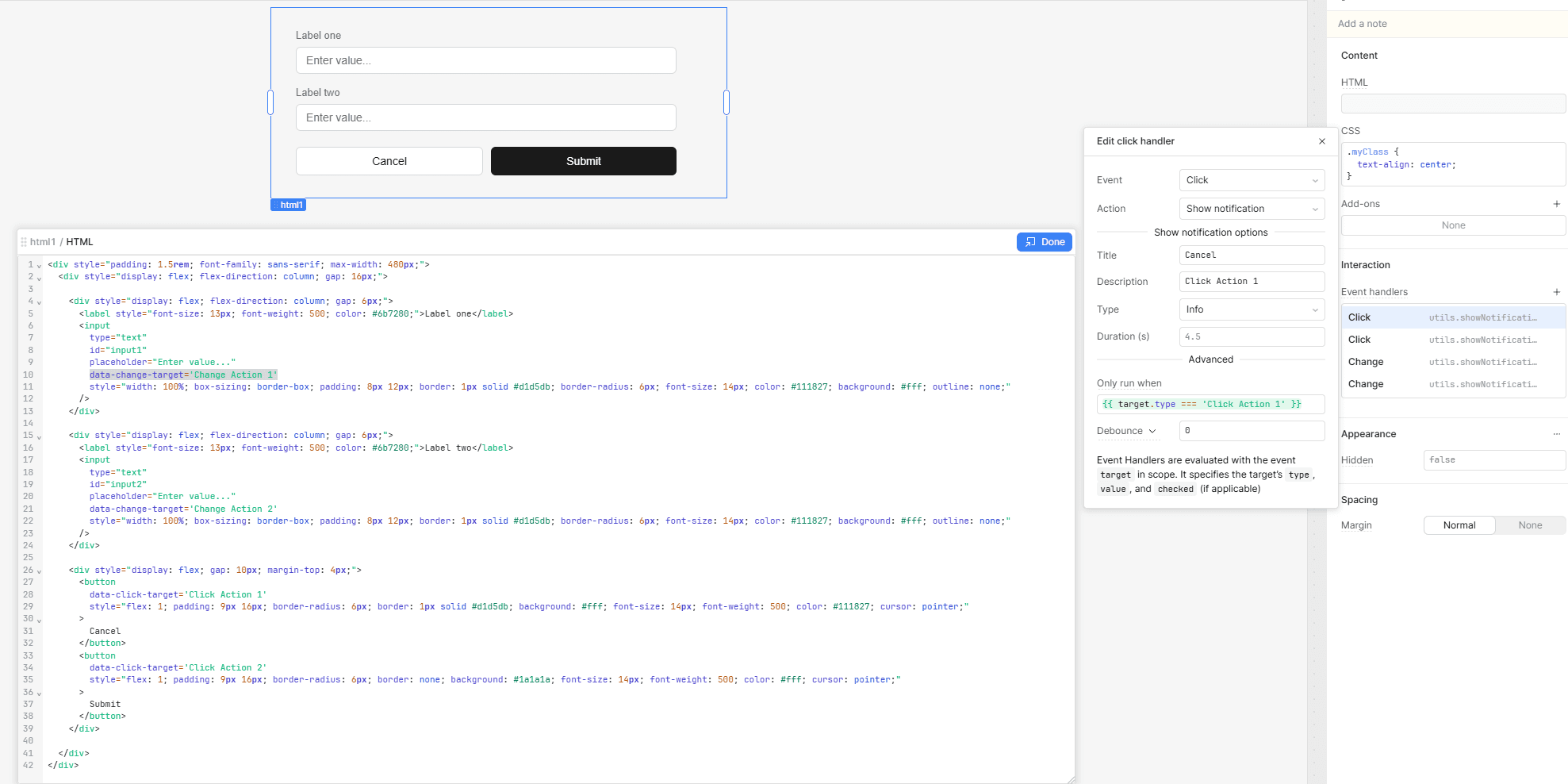
Retool makes the target object available in scope for every HTML component event handler. It exposes three properties: type (the string value you set in the attribute), value (for inputs), and checked (for checkboxes). The handler only runs when the condition evaluates to true, so each element triggers only its own logic.
If two elements should share a handler, give them the same target value. The attribute gives you full control in both directions.
Is data-click-target documented by Retool?
No. The requirement for these attributes isn't covered in Retool's official documentation. It was surfaced through a community forum post and confirmed through direct testing. Notably, the attribute is required for any event handler to work with the HTML component at all, not just for disambiguating between multiple elements. A single button with no data-click-target set will have non-functional Click handlers.
Does this work for change events too?
Yes, exactly the same way. Set data-change-target on each input with a unique string value, then use {{ target.type === 'Your Target Value' }} in the "Only run when" field of each Change handler. Without the attribute, all Change handlers fire on any input interaction. With it, each handler responds only to its assigned input.
FAQ
Do I need data-click-target even if I only have one button?
Yes. The attribute is required for any event handler to work with the HTML component not just for separating multiple elements. A single button without data-click-target will have non-functional Click handlers regardless of how the handler is configured in Retool.
What does the condition look like inside a Retool event handler?
In the "Only run when" field, use {{ target.type === 'Your Target Value' }} where the string matches exactly what you set in the HTML attribute. Retool evaluates this condition before running the handler action. The target object also exposes value and checked for inputs and checkboxes respectively.
Can two elements share the same target value?
They can. If two buttons share the same data-click-target value, both will trigger any handler whose condition matches that value. This is useful when two elements should produce the same result without duplicating handler logic.
What event types does the target attribute support?
Currently click (data-click-target) and change (data-change-target). Those are the two event types Retool exposes for HTML component interactions.
When should I use an HTML component over native Retool components?
When the design or layout requirement is specific enough that Retool's native styling can't meet it. For standard UI patterns, tables, forms, filters, standard button layouts, native components are faster to build and easier to maintain. The HTML component is the right call when the visual requirement genuinely can't be met with Retool's defaults.
The fix described here was surfaced through a Retool community forum post and is not currently documented by Retool. At Stackdrop, we build governed internal tools for mid-market and enterprise clients across EMEA. If you're running into layout or event-handling limits in Retool, get in touch or browse our open-source custom component library on GitHub.