John Miniadis
A guide to help operations and engineering teams turn internal tools into reliable, scalable operational systems.
integration-awareness-internal-toolsInternal tools literacy is how your operations and engineering teams understand, improve, and scale the internal tools and operational systems they rely on every day.
Why internal tools literacy matters
Almost every workflow now has a tool, an automation, or a dashboard attached to it. As teams grow, those tools multiply faster than anyone's ability to understand how they really work together.
Most teams don't struggle because their tools are broken. They struggle because they can't see what their tools could actually do.
For many scaling teams we meet, the real bottleneck is the visibility of how things actually move. No one has a clear picture of how work actually moves through that stack.
Data flows, approval logic, background jobs, sync delays, edge cases, all of these live across tools, and they rarely live in one shared mental model. When that picture is missing, every incident feels random and every limitation feels negotiable.
If you are a COO, VP Operations, or technical leader in a scaling B2B SaaS, fintech, or e‑commerce company, this shows up as fragile internal tools, operational systems that don’t scale, and internal platforms that never quite become the reliable backbone you expected.
This is nobody's fault. You're not doing things necessarily "wrong", you're simply operating inside unclear possibilities. You see the symptoms (i.e manual work, people chasing status in Slack, internal tools that feel fragile) but you don’t have a clean way to see what’s actually possible with the internal tools, internal platforms, and systems you already own.
That’s where internal tools literacy comes in. Chaos isn't the problem here, the problem is an environment where you can’t see the pattern inside the noise. Internal tools and internal platforms, when designed and understood properly, turn that noise into something legible: you can see where data comes from, why a step takes time, and what would happen if you changed it.
In an AI era, where more decisions are mediated by software, teams that understand their internal tools gain a structural advantage.
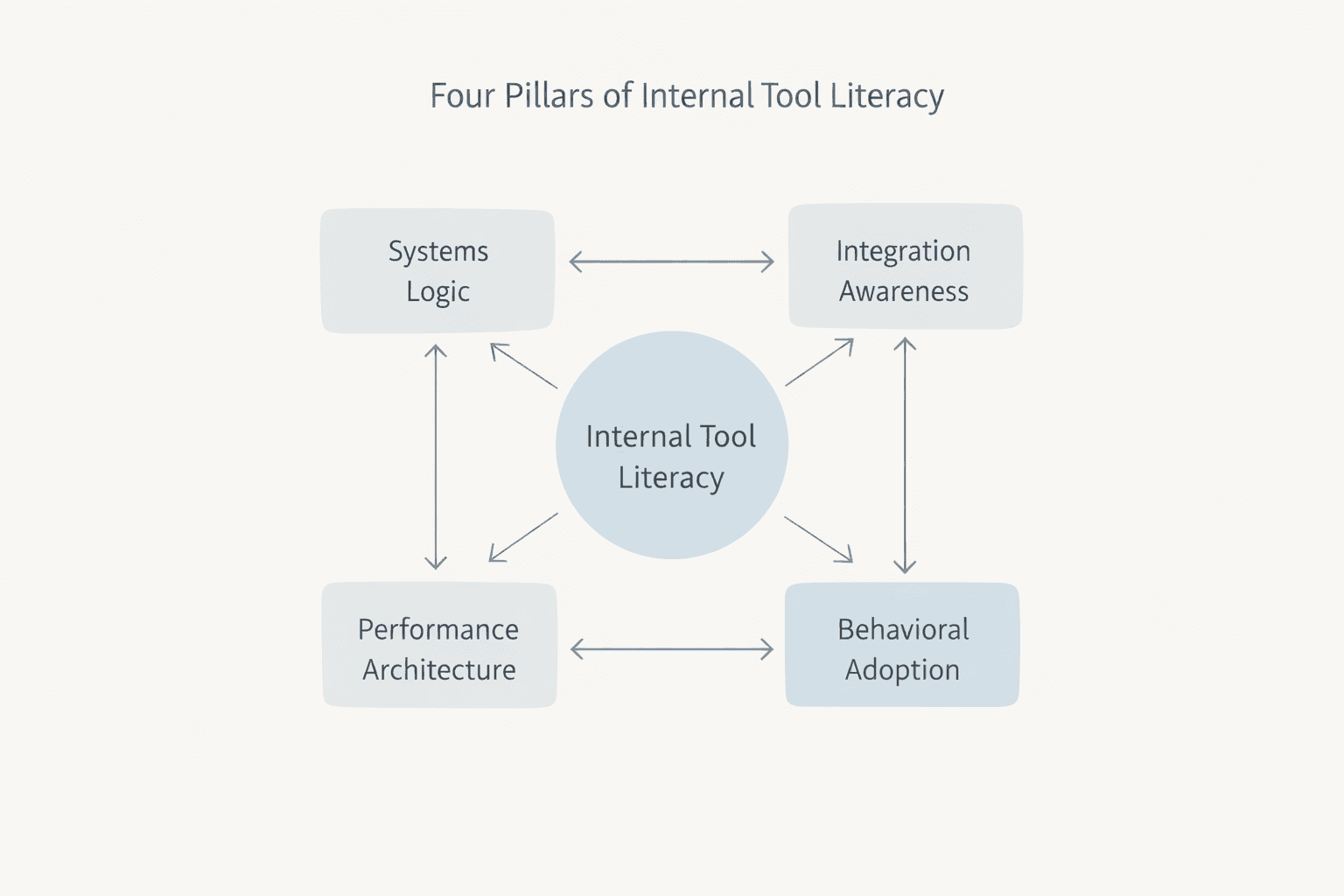
This guide maps the four pillars of internal tools literacy: the basics any modern team needs to understand if they want internal tools and internal platforms to become real operational leverage instead of yet another source of stress. You’ll see why visibility matters more than most teams realize, what’s actually possible with today’s internal tools, and how to start improving things without rebuilding your entire stack.
The visibility debt behind internal tools
As mentioned earlier, most teams don't abandon internal tools because they stopped working, they abandon them because they can’t see what is breaking, or why. At some point, the system becomes a black box where data goes in, something happens, and people only notice it when the output looks wrong.
They start asking "Why can't we just…?" not as genuine questions, but as expressions of doubt. They create shadow spreadsheets alongside your Retool app because Excel feels safer than something they don't fully grasp. They avoid touching the tool at all, afraid that one change will break something invisible.
Stakeholders reopen the same technical conversations every quarter because no one has explained the logic in a way they can see. Your product team and ops team go back and forth on the same constraints. Developers quietly rebuild flows that were "quick fixes" months ago because people stopped trusting the original design. Slack fills up with screenshots: "Why isn't this updating?" "Why does this take so long?" "Can't we just remove this step?" Each question sounds new, but they're all symptoms of the same root cause: invisible system logic.
The cost of this is not only technical debt, it's visibility debt, and it compounds. Decisions get slower because no one trusts the current picture. Incidents take longer to resolve because people have to rediscover how things work every time.
Teams ship fewer improvements because they are afraid of breaking something they don't fully understand. Over time, the organization shifts from designing systems to reacting to them. The tool becomes a surface area for doubt instead of a source of clarity.
And when doubt settles in, people retreat to what they know: spreadsheets, manual work, email chains, the old patterns that at least feel predictable.
Once you can see how your tools actually think, the data paths, the logic sequences, the performance constraints, you can have different conversations. Not "Can we do this?" but "What would it take to make this behavior reliable?" That shift from doubt to clarity is where internal tools literacy begins.

What we mean by internal tools and internal platforms
When we talk about internal tools, we mean the internal apps, dashboards, automations, and workflows your teams use to run operations: refund tools, finance views, onboarding flows, support consoles, logistics dashboards, and more.
These are usually built on platforms like Retool, low‑code builders, or custom admin UIs that sit on top of your core systems. Internal platforms sit one level below: they are the shared operational systems and infrastructure that your internal tools depend on, such as your core databases, APIs, authentication, and messaging or integration layer. Together, these internal tools and internal platforms form the operational backbone that either scales with your company or quietly limits how fast you can move.
For scaling teams, the question is not "do we have enough tools?" but "do our internal tools and operational systems behave in a way we can understand, improve, and trust when volume and complexity grow?"
Pillar 1: Systems logic and how operations actually think about internal tools
Every internal tool is a system, quite literally. It mirrors how your operations actually think: what data matters, in what order decisions happen, what triggers what, and what happens when something unexpected occurs.
This is systems thinking applied to your internal tools: mapping decisions, data, and failure modes so the system is legible.
Most teams treat internal tools like interfaces where you fill in fields, click buttons, and get results. But underneath that interface is logic: queries that fetch data, conditional branches that route decisions, state that carries information from one step to the next.
When you don't understand this logic layer, the tool becomes unpredictable. A field updates slowly and you blame the tool, or a calculation seems wrong and you wonder if the developer made a mistake. Ultimately, a workflow fails and you assume it's broken.
Systems logic literacy means understanding that your Retool app (or any internal tool) is a deliberate sequence of decisions and data flows. It's your operational thinking made visible. When a query runs, it's because you decided that step needs that data, when something happens after you click a button, it's because you designed that sequence. When a field takes a moment to update, it's not a bug, it's a performance trade-off you made (or someone made on your behalf).
Here's what this looks like in practice: A logistics team built a Retool dashboard to track shipments. For months, they thought it was slow. Turns out, 14 queries were firing every time they switched tabs because no one had explained how Retool manages page state.
Once they understood that queries only needed to run when data actually changed and not every time the user navigated, they restructured the logic.
Same tool but dramatically different behavior. The tool wasn't broken; the team just didn't see what was happening inside it.
Understanding systems logic doesn't require you to become a developer. It requires you to ask better questions: Where does this data come from? What happens if this value is blank? What runs when I click this button, and why does this step come before that one?
Example: For a customer onboarding tool, that might mean asking where KYC status comes from, what happens if it's missing, and who gets notified when a decision is blocked.
When you have systems logic literacy, several things shift: you stop blaming tools and start debugging workflows. You can actually evaluate whether a limitation is real or just a design choice, and you understand why certain changes are easy and others are hard. Most importantly, you can have productive conversations with your technical team because you're speaking the same language.
What becomes possible: You move from reactive ("Why is this broken?") to intentional ("Here's what we need to happen, in this order, with these rules"). You can predict how changes will ripple through your system. You can spot opportunities for improvement because you can see the actual sequence, not just the symptoms.
How to start: Pick one workflow that frustrates your team. Map its logic, not the interface and write down what data do we need? What decides what happens next? What's the sequence?
Once you see it on paper, you'll notice what's missing, what's redundant, and what could be automated.
Pillar 2: Integration awareness across your existing internal tools and platforms
Here's the thing: inefficiency usually doesn't live inside one tool, it lives between multiple.
For instance, a team uses Shopify to process orders, Airtable to track inventory, Slack to communicate status, and a Google Sheet somewhere to handle approvals because no one is sure where else it should live.
Each tool works fine on its own, but the space between them is where time actually disappears: the handoffs, the copy-paste work, the manual syncs that eat up hours every week. These cross-tool handoffs are where automation and integration create disproportionate operational leverage.
Integration awareness means understanding what becomes possible when you connect the tools you already have. It's not about building new infrastructure or overhauling your stack, it's about choreography: making existing systems talk to each other so work flows naturally instead of getting stuck in manual steps.
Many teams underestimate what’s possible here because they assume integrations are complicated, expensive, or only for companies with dedicated engineering teams.
In reality, modern internal tools are built specifically to bridge these gaps. You can trigger a Slack message when an approval completes, you can sync data from Shopify into a Retool dashboard and see patterns you couldn't see before, you can even automate an entire approval chain so it doesn't live in someone's email inbox anymore, waiting for a response that never comes.
For example, a fintech client we worked with was manually exporting data from their payment processor, cleaning it in Excel, and importing it into their internal dashboard every single week, four hours of repetitive work, every week without fail. Once they understood what integration was actually possible, that entire workflow disappeared.
Now a Retool app pulls the data automatically, cleans it with a simple query, and updates the dashboard in real-time. Same tools, completely different thinking.
You can find more examples of this kind of impact in our internal tools case studies, where we unpack how operational systems changed once visibility and integrations improved.
Integration literacy starts with seeing what you already have. Look at your tech stack and ask yourself: What systems do my teams actually use every day? Which handoffs happen repeatedly and eat time? Where are people manually moving data from one place to another? Where is communication happening instead of automation taking over? Those friction points are exactly where integrations multiply value without requiring you to rip anything out.
Then ask a different question: What would happen if these tools actually talked to each other? If Shopify could trigger something in your approval process automatically, if your inventory system could alert your fulfillment team without someone checking manually, if your CRM could feed data into your ops dashboard without anyone copying and pasting, or If Slack became the interface for actions that currently require logging into three different tools.
What becomes possible: Handoffs shift from being manual and error-prone to quietly automated, with context moving cleanly between systems instead of getting lost in forgotten emails or scattered Slack threads. Your team spends more time on real decisions and strategic work rather than pushing data from one place to another, and workflows that once took hours fade into the background as invisible processes that just run.
How to start: Begin by identifying the three handoffs that cause the most friction today, the ones your team complains about again and again. For each one, write down what would need to happen for it to run end-to-end without human intervention, then take that list to your technical team and ask a simple question: “Is this possible?” In most cases, the answer is yes, and the effort required is far smaller than people expect.
Pillar 3: Performance architecture for scalable internal tools
An internal app that works perfectly for five users can struggle under the weight of fifty. Not because internal tools or internal platforms are weak, but because performance architecture wasn't built in from the start.
If you’re already building on Retool or another low‑code platform, our guide on building production-ready internal tools with low-code goes deeper into how to make that foundation robust.
Performance architecture is about designing internal tools to handle complexity before it becomes a problem, to think not just about what your team needs today but what they'll need when they double in size, when your data grows exponentially, and when your workflows become more intricate. Unfortunately, from our experience, most teams skip this entirely because they're thinking about immediate needs, not future scale.
This shows up especially as a real problem when teams build everything into a single page. They add query after query, condition after condition, trying to pack all their operational logic into one interface. At first it works fine, then they add more features and more integrations. Suddenly, they notice the page takes seven seconds to load instead of one so people start refreshing manually. They stop trusting the data because they're never sure if it's up to date. Eventually, the tool that was supposed to save time now feels like a bottleneck.
Here's what's actually happening underneath: queries are firing that don't need to fire. Background processes are running constantly even when no one is looking at that page. Expensive queries and repeated data fetching create unnecessary load that could be avoided with caching and more focused workflows. The app isn't broken, it's just carrying unnecessary weight.
Performance architecture solves this through three core patterns: multipage design, query optimization, and strategic caching. Instead of one massive page that tries to do everything, you split workflows into focused pages that only load what's needed. Instead of queries running every time anything changes, you make them run only when their data actually needs to refresh. Instead of fetching the same data repeatedly, you cache it once and use it where needed.
A logistics company we worked with had built a Retool app that was supposed to streamline their operations, but it had become so slow that their team was going back to their old manual process half the time. When we mapped it out, we found that their single dashboard was running over twenty queries simultaneously, most of them pulling the same data in slightly different ways. By splitting it into four focused pages and optimizing queries, we cut load time from nine seconds to under two. The tool became something people actually wanted to use again.
Aspect
| Monolithic dashboard
| Multipage, optimized app
|
Page structure
| Single page with all workflows
| Split into focused flows
|
Queries
| 20+ queries on load
| Queries scoped per page
|
Load time
| ~9 seconds
| <2 seconds
|
User behavior
| Refreshing, workarounds
| Trust and reliance
|
What becomes possible: When internal tools feel fast and responsive, teams are far more likely to adopt them and actually rely on them instead of falling back on manual workarounds. You can keep adding features and integrations without the system slowly degrading over time, and the tool stays reliable as usage grows. Most importantly, you end up with something that runs on its own, not a system that needs constant babysitting or leaves someone worrying about whether it’s going to slow down again.
How to start: Start by looking at your slowest internal tools and asking what they’re really doing under the hood. Are they trying to handle too much on a single page, running heavy queries even when no one is actively using them, or pulling data that could easily be cached? You don’t need to rebuild everything in one go, but spotting these patterns early is the first step toward creating tools that scale alongside your team instead of working against it.
Pillar 4: Behavioral adoption and shared understanding of your internal tools
Internal tools literacy isn't only technical, it's cultural. You can build the most elegant internal app, architect it perfectly, and integrate it beautifully, and it can still fail if your team doesn’t share a basic understanding of how it works and why it was designed that way.
Behavioral adoption is about creating the conditions where people actually use a tool, trust it, and feel confident making decisions based on it. It’s the difference between something that technically works and something that becomes part of how your organization actually operates.
Most teams skip this layer because it feels soft compared to engineering work. But this is where tools either become trusted infrastructure or quietly turn into abandoned shadows next to the spreadsheets or manual processes that people never truly stopped using. When system logic isn’t clear, people default to what feels safest and most familiar, even if it’s slower.
Behavioral adoption has three parts: shared language, basic documentation, and active feedback.
Shared language means the team agrees on naming conventions, knows which tool owns which decision, and can ask sensible questions about how something works.
For example, agreeing that an "Orders Dashboard" is the single source of truth for order status, not a separate spreadsheet, reduces confusion and rework.
Basic documentation doesn’t mean a 50-page manual. It can be a simple Notion doc or a Miro map that explains what the tool does, who owns it, how to use it, and who to contact if something breaks.
Active feedback means regularly checking in to see whether the tool is being used as intended, where people are struggling, and how real workflows have changed.
What becomes possible: When this foundation is in place, tools stop feeling like black boxes. Teams rely on them instead of working around them. Improvements become easier because people know what to change and why. Ownership spreads beyond a single person, and you avoid building systems that only work as long as one individual is around to keep them running.
How to start: To start, pick your most used internal tool and ask a few simple questions. Does everyone understand what this tool is for? When should it be used instead of something else? If it breaks, who is responsible, and how does an idea for improvement get surfaced? If the answers aren't clear, that's your signal. Write them down, walk the team through them, and revisit them regularly. Small, consistent acts of documentation and communication are often enough to turn a tool from a source of hesitation into a source of confidence.
Technical leaders: Why your internal tools keep failing (even when you know the tech)
If you’re a CTO, engineering lead, or dev manager reading this, none of this technology is new to you. You already know what internal tools can do. You write JavaScript, understand databases and APIs, and you’ve probably built internal tools yourself. And yet, many of those tools still underperform, get abandoned, or require constant firefighting to keep them usable. The issue isn’t the tech, It’s the way the work is approached.
Across scaling technical teams, we see the same patterns surface again and again. Recognizing them early is what allows teams to fix them before they harden into long-term problems.
Pattern 1: Building for the builder, not the user
Internal tools are often designed by engineers for engineers. The result is usually powerful but unintuitive interfaces, minimal documentation, and heavy reliance on tribal knowledge just to get basic tasks done. A tool that feels obvious to the person who built it often feels confusing to the ops team expected to use it every day. Without understanding how real users approach the tool, you end up solving your own problems as a builder rather than theirs as operators. This is where behavioral adoption becomes critical.
Pattern 2: No clear ownership or lifecycle
Many internal tools start as side projects. Someone builds a quick operations dashboard to solve an immediate pain, it works, and it slowly becomes the tool everyone depends on, for example a "quick" finance view that is now used daily by the finance team with no clear owner. Over time, nobody truly owns it. There’s no clear decision maker for improvements or fixes, and maintenance becomes ad hoc. The tool gradually decays until it’s more fragile than useful. This is the visibility debt we addressed; when ownership is unclear, system logic becomes invisible, and nobody knows who to go to when things break.
Pattern 3: Overengineering too early
Teams often design internal tools as if they’re future external SaaS products. That leads to complex architectures, premature optimization, and features built for scale that doesn’t yet exist. Months pass before the tool solves a real problem for anyone. Performance architecture should respond to actual constraints, not theoretical ones.
Pattern 4: No feedback loop after launch
The tool ships and then the team moves on with no mechanism to capture what's working, what's not, or where people are struggling. Months later, it becomes clear that the tool is being used in unexpected ways, but by then workarounds are deeply embedded and changing course feels risky. Internal tools literacy only works when teams actively learn how the system is being used in practice.
Pattern 5: Discovery is treated as requirement collection
Discovery is often reduced to gathering feature requests, where a stakeholder asks for a dashboard that shows X, Y, and Z and the team immediately starts building. The problem is that requirement lists describe outputs, not the work itself. Proper discovery should focus on how decisions are actually made, in what sequence they happen, what information is required at each step, and what breaks when something goes wrong. When teams skip this step, they end up building tools that technically meet requirements but fail to support real operational logic. Requirement collection gives you a list; discovery gives you operational logic, which is pillar one and the foundation for everything that follows.
Pattern 6: Product thinking introduced too late in the process
Internal tools are treated as engineering projects until usability becomes a problem, but by then the architecture is set, the decisions are made, and changing the interface means reworking the entire system. Usability shouldn't be an afterthought; it should inform every architectural decision from the start, which is where behavioral adoption prevents months of rework later.
Pattern 7: Architecture decisions made without end-user context
Architecture choices are frequently driven by technical ideals instead of how teams actually operate day to day. A multipage design might be cleaner from an engineering perspective, but if the workflow does not naturally split that way, it adds friction instead of reducing it. Similarly, caching strategies that look correct on paper may not match how users expect data to behave in real workflows. Architecture should reflect how people work in practice, not how engineers assume they should work.
The common thread
Notice what connects all seven patterns: A lack of visibility into how internal tools are used and maintained over time. Decisions about architecture, features, and ownership are often made in isolation, which creates systems that technically function but struggle to gain adoption or remain stable. The four pillars exist to counter this by grounding system logic in operational reality, aligning integrations with meaningful handoffs, designing performance architecture around real usage patterns, and addressing the human side from the start instead of treating it as an afterthought.
For technical leaders: A quick assessment
Looking back at your recent internal tool projects, ask yourself whether ownership was clearly defined after launch or whether the tool quietly became a side responsibility. Consider whether discovery focused on understanding how work actually happens or simply collecting requirements, and whether product thinking influenced architectural decisions early on or was introduced later as a fix. Ask whether you are actively learning how the tool is being used today and whether it was designed for its real users or primarily for the team that built it. If several of these questions raise doubts, you have likely encountered these patterns already, and if you are building new tools now, they may already be forming again.
How Stackdrop approaches these patterns
Rather than treating internal tools as pure engineering projects, we approach them as operational systems that need to hold up under real usage over time. We start with three foundational commitments that shape how decisions are made from the start and prevent the common failure patterns from taking root.
Discovery that maps operations, not features
We focus on understanding how work actually flows, where decisions are made, and how information moves between people and systems. This allows architecture to reflect operational reality, reduces unnecessary complexity, and prevents overengineering before real constraints exist.
Teams that think in product, not just code
Every project has clear ownership over user experience and over the underlying workflow, so usability and operational clarity inform architectural decisions from day one instead of being treated as a fix after friction appears.
Clear ownership and feedback loops from launch
We don’t hand off a tool and disappear. Ownership is defined early, feedback mechanisms are established from the start, and the system evolves based on how it’s actually used, not just how it was intended to be used.
→ This is why internal tools literacy matters so much in our work. It’s what keeps these patterns from quietly embedding themselves into your systems and turning into expensive problems later on.
Pillar Integration Patterns: How the four pillars reinforce each other in practice
The four pillars don't exist in isolation. Their real strength shows up when they reinforce each other, and their weaknesses become obvious when even one is missing. Looking at how they interact makes it easier to see where your internal tools are fragile and where they're actually resilient.
Let's walk through a real workflow and see how each pillar plays a role: an approval process for customer refunds.
Scenario 1: Systems logic alone (but missing Integration, Performance, Adoption)
You’ve built a Retool dashboard that shows pending refunds. The logic is solid: it pulls data correctly, the conditions are clear, and technically the system works. The problem is that it lives entirely inside Retool. When an approval is needed, someone still has to log into Retool, open the dashboard, find the refund, approve it, and then manually notify the fulfillment team in Slack/Teams, etc. The tool creates visibility into the logic, but the workflow still relies on human handoffs. Without integration, the process remains fragmented, even though the system logic itself is clear.
Scenario 2: Systems logic + Integration (but missing Performance and Adoption)
Now you've connected the workflow: When an approval happens in Retool, a Slack message is sent automatically to fulfillment. On paper, the system looks complete. Over time, however, the dashboard grows so large with so many queries that it takes seven seconds to load. People stop opening the tool unless they absolutely have to and quietly fall back to checking queues manually. Performance architecture was never addressed, and as a result, adoption fades. The system technically works, but practically, it’s abandoned.
Scenario 3: All four pillars working together
Here's how it actually scaled: Systems logic is clear and explicit. with approval rules documented and understood across the team. Integration ensures that approvals trigger Slack notifications and update the fulfillment queue automatically in real time. Performance architecture keeps the dashboard fast through multipage design and strategic caching, so it consistently loads in under two seconds. Behavioral adoption is strong because the team understands how the system works, trusts it, and uses it without hesitation. Refunds move from approval to fulfillment in minutes instead of hours, with no manual coordination required. The workflow disappears into the background because it’s doing exactly what it should.
Where teams get stuck
We see teams implement the pillars at different speeds, and that imbalance creates predictable failure patterns. Some teams invest heavily in systems logic and integration but never address behavioral adoption, so half the team still relies on spreadsheets simply because no one explained why the tool works the way it does. Others establish ownership and feedback loops but skip performance architecture, causing the tool to degrade as usage grows. Some overengineer performance early without proper discovery and end up optimizing workflows that don’t reflect how work actually happens.
The pattern is consistent.
Skip one pillar and the entire system becomes fragile. Include all four, and internal tools become actual operational infrastructure.
Assessing your tools
Take one internal tool your team relies on today and ask a few simple questions:
Can you clearly explain how it works and why it behaves the way it does? Does it connect cleanly to the other systems your team uses every day? Can it handle current usage without becoming slow or unreliable? Do people understand it well enough to use it confidently without workarounds? If the answer is no to any of these, the issue isn’t the tool itself. It’s a gap in one of the pillars, and that gap is fixable.
How to run an internal tools audit
Before rebuilding anything, it’s worth running a simple internal tools audit to see how your current operational systems really behave. The goal is to understand where your internal tools and internal platforms are helping you scale and where they are quietly creating friction.
Here’s a practical way to do it:
Inventory your internal tools and workflows
List the internal apps, dashboards, and automations your team relies on (Retool apps, custom admin tools, spreadsheets, scripts), and note which teams use each one.
Map data flows and handoffs
For each internal tool, map where data comes from, where it goes, and which handoffs still happen manually between systems or teams.
Identify visibility and performance gaps
Mark places where people don’t trust the tool, where incidents feel random, or where the UI feels slow or fragile in day‑to‑day use.
Assess ownership and adoption
For each internal tool, write down who owns it, how changes are requested, and whether people actually use it as the single source of truth or work around it.
Once you’ve done this, you have the raw material for a focused internal tools roadmap: a short list of systems where improving visibility, integrations, performance, or adoption will create disproportionate leverage.
If you want a structured way to do this, you can use our Internal Tools System Readiness Checklist. It walks operations and engineering leaders through a practical internal tools audit in under an hour

What high internal tools literacy makes possible
We've spent this guide naming the patterns that break internal tools: visibility debt, comfort zone bias, architecture decisions made in isolation, and teams that don’t share a common language around their systems. These patterns are real and they're expensive.
But here's the other side of that coin: When internal tools literacy is high, the entire environment around your tools becomes clearer, and that clarity changes how teams operate. Operational workflows become easier to map, adjust, and automate because system visibility is higher and dependencies are explicit.
The tools themselves don’t become magical. It's that the environment around them becomes legible. Decisions move faster because people trust the data in front of them and improvements compound instead of stalling and teams spend less time maintaining fragile systems and more time innovating.
Here’s what that actually looks like:
Approval chains move from manual to automatic
Before: Customer refund requests are scattered across Slack, email, and spreadsheets. Someone manually checks each request against policy, tracks it through the approval chain, and remembers to notify fulfillment. The timeline depends on who’s paying attention, and the cost shows up as hours lost to context switching and status chasing.
After: a refund request triggers a Retool workflow. The system evaluates it against clearly defined rules, approvals happen automatically, and fulfillment is notified instantly in Slack. The timeline shrinks to minutes, and manual coordination disappears.
Operational insight becomes visible
Before: Your ops team runs monthly reports in Excel, pulling data from three systems, cleaning it manually, and spending a day on something that should take an hour. The reports are always slightly out of date by the time they're done.
After: a Retool dashboard pulls data in real time, caches it intelligently, and updates continuously. Leaders see what’s happening now, not what happened weeks ago, and decisions reflect current conditions.
Teams stop losing institutional knowledge
Before: Critical workflows live in one person’s head. When they’re unavailable, things slow down. When they leave, the system gets rebuilt from scratch because no one fully understands how it works.
After: Logic is visible, documented, and easy to reason about. New team members can understand the system quickly, and the tool no longer depends on a single person to keep it running. It behaves like infrastructure, not a personal project.
Rebuilds stop being the default response
Before: Every small process change triggers a rebuild. It’s faster than expected, so it keeps happening, but the cost accumulates quietly over time.
After: Modular architecture and clear logic make change surgical. You adjust a rule, swap an integration, or tweak a page without tearing the system apart and now improvements take hours instead of weeks.
The same conversations stop repeating
Before: Product and operations revisit the same debates every quarter. Can we do this? Why not? Because of a system limitation. Why does that limitation exist? The answers never quite land because the logic isn’t visible.
After: Because system logic is transparent, those conversations end. Instead, they shift from questioning what’s possible to deciding what’s worth doing, because everyone can see how the system works and where the real limits are.
The emotional shift
The most important change isn’t operational. It’s psychological. Teams move from reactive anxiety, wondering whether something will break, to quiet confidence built on understanding. When people can see the system and reason about it, they stop fearing it. Internal tools stop being a source of stress and start becoming a source of leverage.
That’s what happens when internal tools literacy is high.
For a deeper dive into long-term architecture decisions, you can read our article on how to build scalable internal software that lasts
Next steps: Assess and strengthen your internal tools
You don’t need to overhaul your entire stack to make progress. Real improvement starts with visibility, shared understanding, and a few deliberate decisions made in the right order. When one pillar gets stronger, the others tend to follow, because the system becomes easier to reason about instead of harder to manage.
Start with the checklist below. Work through the five sections honestly, count your checkmarks, and identify the pillar where coverage is weakest. That’s not a failure point, it’s your highest-leverage starting place. From there, choose one concrete action you can take this week. Map a workflow end to end. Write down how a key tool actually works. Identify a handoff that could be automated. Or bring the team together for a short conversation about how a system behaves in practice.
What changes things isn’t more tooling or more features. It’s the ability to see how your systems behave, why they behave that way, and what would happen if you changed them. Once that clarity exists, decisions stop feeling risky and improvements stop stalling.
If you want to go beyond assessment and start strengthening the parts of your internal tools that matter most, this is where Stackdrop comes in. We help teams turn these insights into internal tools and internal platforms that hold up under real usage, scale cleanly, and earn trust across the organization.
Download the System Readiness Checklist below and use it as your baseline for an internal tools audit. When you're ready, bring it to us — we’ll help you identify where to focus first and how to move forward deliberately, before fragile patterns have a chance to settle in.
Ready for hands-on support? Book an internal tools assessment conversation with our team and we’ll help you pinpoint which pillar will give you the most leverage right now.
Download the System Readiness Checklist (PDF)
FAQ: Common questions about internal tools and operational systems
What are internal tools in a scaling company?
Internal tools are the internal apps, dashboards, automations, and workflows your teams use to run operations every day, usually built on platforms like Retool or custom admin UIs.
What is an internal tools audit?
An internal tools audit is a structured review of your internal apps, data flows, and handoffs to find where visibility, integrations, performance, or ownership are blocking your operations.
When should we rebuild an internal tool instead of improving it?
Rebuilds make sense when the workflow has fundamentally changed or the architecture can’t support basic performance and reliability, even after targeted fixes.
How do I know if my internal tools are failing?
They’re failing when teams avoid them, rebuild work in spreadsheets, or treat incidents as random. That usually signals gaps in visibility, integrations, performance, or ownership.
Who should own internal tools in a scaling company?
Ownership is usually shared: operations owns the workflows and outcomes, engineering or a platform team owns the architecture and reliability, and both align on a clear feedback loop.